Answers
Access & platform
What PC specs do I need?
No hard minimum: it runs on low-end machines with graphics turned down.
- In the faction-war maps (Cloud Wake, The Gallows), lower the render distance.
- To keep an eye on it, turn on the FPS and ping display in Accessibility settings. P or the button at the top opens settings.
- Use Chrome or Edge; some players find Edge smoother.
If FPS is low on a strong PC, Chrome may be using the integrated GPU:
- Set the browser to High performance in Windows Settings > System > Display > Graphics.
- Restart the browser.
Can I use a controller?
Yes. The game supports gamepads and shows the full layout on its Gamepad controls screen.
- PlayStation controller confirmed.
- Left stick steers (click and push up or down to zoom); right stick looks (click for the cursor).
- LT boosts, RT fires the main thrusters; LB cycles targets, RB drifts.
- Y harpoon, B module 5, A reverse thrust, X cargo; the D-pad uses modules 1–4.
- Hold View to ping; Menu opens fitting.
Good to know
- With the harpoon attached, LT winches in and RB winches out.
- In menus, the left stick moves the cursor, A selects and B goes back.
Where are the servers? Is there more than one?
US-based, with one server instance right now.
- A room becomes instanced once it hits the player cap.
- Distance to the US server is one of the things that makes the first load slow.
- To see your ping, turn on the FPS and ping display in Accessibility settings (P opens settings).
- VPNs have caused sign-up and loading issues, so try without one if you have trouble.
Does a VPN cause problems?
It can: VPNs have caused issues with sign-up and loading.
If sign-up fails or the game won't load:
- Turn off the VPN.
- Refresh and wait; the first load can take a while.
- Still stuck? Try Chrome or Edge, then restart the PC.
Is the game available in other languages?
English only for now.
Localization is planned during beta.
Camera and controls basics
Open settings with P or the button at the top.
- Unlock/recenter the cursor: H or middle mouse.
- If the camera makes you dizzy, set it to not track ship rotation.
- FPS and ping display are in Accessibility settings. UI scale is adjustable in settings.
- Hotkeys are rebindable.
Other inputs you'll use early:
- Tab locks a target, nearest your cursor first. Tab again within 0.5 s cycles to the next; Tab on your locked target unlocks it.
- Right-click harpoons: once to connect, again to let go or retarget.
- Camera modes: B tracks your target, M orbits your ship, J side view, G low chase, N nose view. Press the key again to return.
- Hold left click for the ping wheel.
- Q while hovering a target or mineral fragment launches drones, if a Dronelink is fitted.
Warning
A game tab left in the background for over a minute disconnects.
How long does the beta playtest last?
Two weeks: the beta ends on 15 October 2026.
- Gameplay opened on 30 September 2026.
- It was first announced as one week; Beta Patch 2 extended it to two.
- Progress is wiped between test phases, so treat everything you own now as temporary.
Changed in Beta Patch 2: before the end date was announced, the beta was expected to last about 2 weeks.
How do I get beta access?
Access is given out in waves announced on X and in Discord.
- Beta access is for playtesting, not an investment.
- Once in, you play in a desktop web browser (Chrome or Edge), with no install.
- VPNs have caused sign-up issues; try without one if sign-up fails.
How do I recover a chat message I lost?
Type /oops in chat.
It brings back the message you lost.
Project & economy
Is this a crypto game? Do I need crypto?
You can play without touching crypto.
- It has a real-money economy, but crypto sits in the backend.
- There are no tradable assets yet, and the team says there will be no airdrop.
- Beta access is for playtesting, not an investment. Progress is wiped between test phases.
- For now ships are manufactured in-game; the team says they would eventually be itemized as NFTs and burned when destroyed.
Will ships be NFTs? Is there a cap on ships?
Ships are currently manufactured in-game.
- Build one at the Forge from a ship blueprint and materials in your hub stash, or buy a hull from merchants or the Quartermaster.
- Eventually they would be itemized as NFTs and burned when destroyed.
- Losing a ship is already permanent: its fitted modules and cargo go with it, except what is in the safety hold.
- No caps other than player time and death.
Is AI used to make the game?
To help write code, yes.
All art is handmade.
Death & risk
What happens when my ship is destroyed?
Permadeath: you lose the ship, its fitted modules and its cargo, except what is in the safety hold.
- Your hub stash is never at risk.
- The ship's level and affinity points go too.
- The rest drops in the wreck for anyone to loot, you included.
- Faction-quality items, fitted or in cargo, are destroyed, not dropped.
- The safety hold is four cells in a fixed 2×2 square at the top left of every cargo grid. Items fully on it are kept.
- Items partly on it are kept by a chance proportional to the share covered, shown in their tooltip.
- Items with the safe cipher (Tek cipher Lucky Cigarettes) are also kept.
- Kept items go to your hub stash.
Tip
Before undocking, move valuables fully onto those cells.
Changed in Beta Patch 2: most hulls had two safety cells; the Acolyte, Eidolon and Starrk had none. Safety hold improvements are coming.
Do I lose the free starter ship too?
Yes, it is destroyed like any ship.
- If you are left in a hub without a hull, you are issued a free replacement Seraph at Faction quality (15% less hull, armor and heat capacity than Standard).
- Losing the faction starter ship also costs Merits: 25% of the ship's build rating.
- It also sends you back to your faction's hub; this applies during the Faction war.
- Its starter fit: a Mining Laser, an Armor Repairer, a Sonar Ping and three Flak Cannons.
Tip
Build a few spare ships before you take big risks, so a loss is a short delay rather than a restart.
Are duels safe?
No. Duels are fights to the death.
- The loser loses their ship.
- Hubs are otherwise safe: nobody can attack you there unless you both agree to a duel, so a fight can't be forced on you.
Tip
Only accept a duel in a ship you can afford to lose.
Where do enemy players enter a map?
It depends on the map.
- On the lanes between the faction hubs and Greylock, they usually come in from the opposite side.
- They can also arrive through any other breach that connects to the map.
Good to know
Since Beta Patch 2 the game prefers to bring arriving pilots in 11 km from hostile pilots, up from 7.1 km.
Getting started
How do I leave the hangar / start a run?
Open the Overworld map at the top of the screen and choose a breach.
You'll need
- In the hub, check your build rating (the fitting screen shows it as Ship Build Rating). It adds up the hull, fitted modules, affinity points spent and 25% of your cargo.
- Open the Overworld map at the top of the screen.
- Choose a breach whose build-rating range your ship falls inside. For a first run, pick one of your faction's lower-tier breaches, which the enemy faction cannot enter.
Tip
Deeper tiers open only after you have cleared the tier before, which you do by extracting from it.
Can I restart from scratch or redo the tutorial?
Yes: clear your browser's cache and site data, then reload.
- Trade anything valuable to a friend first. Everything on your old account is lost.
- Clear your browser's cache and site data.
- Reload the game. You start completely fresh, combat tutorial included.
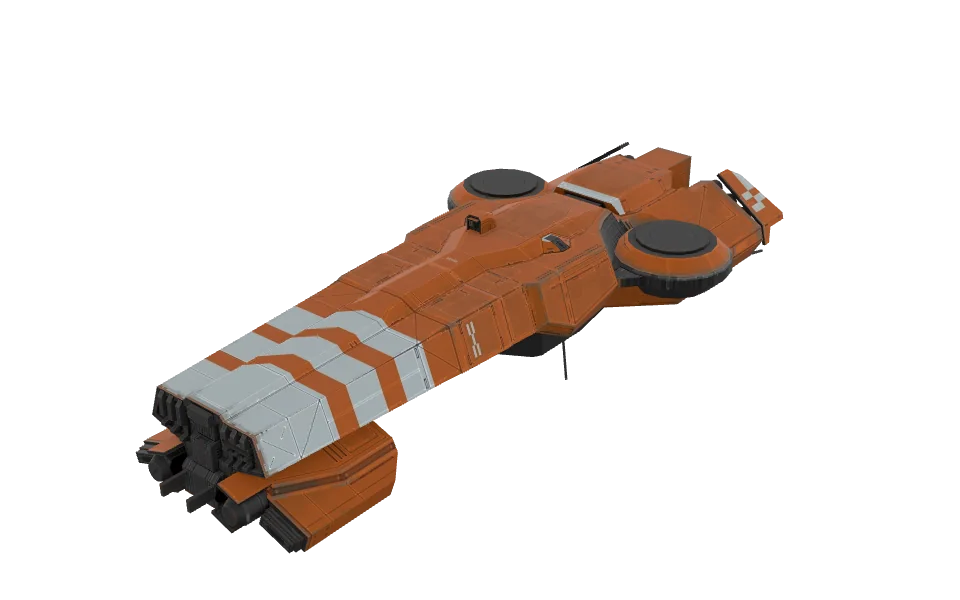 Seraph
Merits & faction war
Where is the Quartermaster?
In your faction hub: Zhat Kali for Tzhal, Ganden for Ganden.
- Get home: in a breach, take the extraction marker (green box) for your hub, e.g. ZHAT.
- In the hub, look for the arrow or neon sign above the Quartermaster.
- Since Beta Patch 1, vendors also have yellow HUD markers.
- Fly up to the Quartermaster and press F to harpoon onto it. That opens the shop.
It sells mining lasers, Faction-quality ship blueprints and repair charges for Merits.
Tip
Greylock has the blueprint and industry merchant, another place to get blueprints.
Can I change my faction?
Yes: the developers can change it if needed, so ask in the Discord.
A developer also suggested a workaround:
- Trade your items to a friend.
- Clear your browser's cache to start fresh.
- Pick the other faction.
- Have your friend trade everything back.
Good to know
Since Beta Patch 2 the faction picker closes the leading faction to new recruits.
Fitting
What are ports?
The notches on module edges.
They connect to conduits and ciphers.
- A module holds up to 4: up to 2 on a one-cell module, 3 on a two-cell module, 4 on three cells or more.
- Only Normal-rarity modules roll ports when they drop or are built. Other rarities only have them through a Ports modifier.
- Higher blueprint research tiers roll more ports on builds; deeper breach tiers roll more on drops.
- Ports sit at random along the edges and turn with the module when you rotate it.
- An empty port takes no grid space. Filling one with a cipher adds the cell it points at to the module.
- A Janus adds one port to a module that has none.
How do Regalia set bonuses link?
Pieces must physically touch each other.
- Two pieces of a set link when their shapes share an edge. Corners don't count.
- Conduits do not count as a link (the devs are debating changing that). A cell added by a Tek cipher doesn't make a link either.
- Links chain: three pieces in a row count as three. Only the largest connected group of a set counts.
- Only fitted pieces count; pieces in cargo or the stash do nothing.
- Connecting more of the set unlocks more modifiers, and the tiers add up: with three linked you get the two- and three-piece bonuses.
- You can't fit two copies of the same piece.
Example: Amnion's Consecration has four pieces.
Tip
The fitting grid highlights the edges where two pieces of a set touch.
How do cipher keys work?
Attach ciphers to a Normal module, then apply the key.
You'll need
- Pick one with exactly the key's number of ports, identified, not Faction quality. Easiest: craft it from a researched blueprint.
- Attach the ciphers to its ports. Each adds the cell its port points at to the shape, and can't currently be removed.
- Apply the key. The module becomes a harmonic.
Good to know
- All known keys use two ciphers, so the module needs exactly two ports.
- A cipher that makes a fitted module too big to fit is refused, not used up.
- Ciphers landing on random ports is a bug being fixed: you should get to pick.
- Wrong module type? A developer suggests changing it with a Thoth adapter, then applying the key.
Warning
A harmonic adds 1,000 to its build rating.
What does Tek Resonance do?
It increases the bonus from tek cipher and harmonic stat modifiers.
- For any number of ciphers on your grid.
- It does not boost cipher special effects.
- It is a stat on the Rune artifact. Artifact ships carry a special modifier.
What it boosts:
- Tek ciphers sit in module ports, and each adds a stat bonus, e.g. Nyx gives turret damage +12%.
- A harmonic is what you get when a Cipher Key activates the ciphers on a Normal module. It gets stat bonuses of its own, e.g. Prime Cascade (Nyx + Vel on a turret): fire rate 15% faster, tracking +26%.
Is build rating (PR/BR) a good measure of strength?
A decent indicator for modules.
- Larger modules have higher ratings and bigger bonuses.
- For ships it reflects size and material cost more than power; small ships can be very good. Bare hulls run from 2,150 (Eidolon, a scout) to 2,800 (Mammon, a hauler).
What goes into it:
- An item: its base rating plus each rolled modifier (11% of base at T1 up to 44% at T4), times its quality. A Regalia piece rates 1.75 times its base module; a harmonic adds 1,000.
- A ship: hull, fitted modules, affinity points spent and 25% of cargo.
It also sets what you're worth: the Merits for killing you are based on your fitted build rating.
Where do ciphers drop?
From guardian and golem robots, and from Thermavores.
- Some maps also have a relic vault event. Complete it and it drops a batch of ciphers.
- No merchant sells ciphers.
Good to know
Once a cipher is attached it stays on the module for good.
How do critical chance modifiers work?
They raise the turret's own base critical chance; they aren't added on top as a flat percentage.
- Every turret has its own base critical chance, and it differs from turret to turret.
- A critical chance modifier increases that base value rather than adding its number to it.
What's the difference between thrust and torque?
Thrust pushes your ship forward; torque turns it. Mass works against both.
- Thrust sets your acceleration: how quickly the ship reaches max velocity. Acceleration is thrust divided by mass.
- Torque is the turning force. Turn rate is torque divided by mass.
- Mass is the hull plus every fitted module. More mass lowers acceleration and turn rate for the same thrust and torque. Top speed doesn't depend on mass.
- Your ship's stats show the results under Mobility: turn rate (°/s), acceleration (m/s²) and mass (t).
- Modules such as Impulse Nacelle and Plasma Burners add thrust.
Good to know
Beta Patch 2 made the Thrust Scrambler shut off an NPC's boost and the Torque Snare shut off its drift. What they do to player ships isn't confirmed yet.
Combat
My turrets won't fire at the locked target.
You're probably out of range.
The range indicator above the turret in the module bar turns green when in range. Close in until it does.
If it's green and they still hold fire, check:
- The lock: pressing Tab on your locked target unlocks it. Press Tab to lock again.
- Sensors: the target must be inside your sensor range with line of sight. A blip can't be targeted.
- Heat: during a SCRAM your turret batteries are suspended while heat is held at zero for 3 seconds.
- Enemy ECM: a Tracking Disruptor briefly disables its target's turrets, and a Signal Jammer briefly stops nearby enemies' turret fire.
- A Remote Tracking Shroud stops enemy turrets firing on the squadmate it covers.
To reach further:
 Triangulator (+10% turret range) or
  Tracking Computer (briefly +100% sensor range).
How does range affect damage?
At 2x optimal range damage is about 30%.
- Optimal range is per turret type. A battery uses the average optimal and falloff range of its turrets.
- Marksman perk: -50% damage at 25% of optimal or closer, scaling to +100% at 125% of optimal or farther.
- Brawler perk: +100% at 35% of optimal or closer, scaling to -50% at 125% or farther.
- Both are Turret affinity perks at 20 points spent. You pick one, and the pick can't be changed.
- Both thresholds follow each turret's optimal range. With short-range turrets such as the Flak Cannon, Brawler's bonus only applies very close: about 250 m.
Tip
To push your range out (which also widens Brawler's bonus range), turret affinity has an option worth +1% optimal range per point, and a Triangulator adds +10% turret range.
Should I mix different turret types?
Usually not.
Turrets that rotate at different speeds and have different optimal ranges are harder to keep on target.
- Every turret of one family joins one battery; a different family forms a second battery.
- A battery takes its damage, ranges (optimal and falloff), tracking, crit chance and cycle time as the average across its turrets.
- Each family gives its battery one ability, such as Rapidfire on the Auto-Cannon or Charge Shot on the Railgun.
- You can fit at most six turrets of one family, and no more Battery modules than the hull has battery hardpoints.
Tip
Heat rewards families differently. In the Optimal zone, Auto-Cannons, Flak Cannons and Railguns fire about 10% faster; Rampart Gatlings and Vanguard Lances 25% faster.
What are the damage types?
Kinetic (turrets, drones) and high-explosive (missiles, torpedoes, mines).
Base resistances since Beta Patch 2:
Defense Kinetic High-explosive Armor 24% 20% Shields 10% 30% - A resist is the share of incoming damage prevented. Shields counter high-explosive best; armor counters kinetic.
- High-explosive resist can be raised only through shield modifiers. Armor's can't go above its base.
- Kinetic resist: an Armor Hardener gives +35% armor kinetic resist while running (45% in the Optimal heat zone); Armor affinity adds +0.75% per point. A Heat Purge System lowers it by 40 while running.
- Only mines deal splash damage. The Flak Cannon's Shockburst may be an exception.
- Ramming does no damage yet. Ship stats also list an acid resist; nothing known deals acid damage.
Changed in Beta Patch 2: shields had 0% resistance to both before.
How do signature radius and cloaking work?
Turrets track based on your signature radius, so a smaller signature is harder to hit.
Your signature grows in flight with heat in the reactor, each shot you fire, any throttle above zero, and a SCRAM (+1,500). A ship coasting cold with its guns silent is hardest to track.
- Shrink it: Dampening Baffle (-14%), Ghost Rack (-16%), Echo Array (-10%).
- Grows it: a Mining Laser (+20%), or an enemy Target Painter on you (+200%).
- Signature doesn't affect missiles or mines, or how far away you're detected.
Detection is separate:
- Everyone sees up to 10 km. Within their own sensor range (usually 4–6 km) they also see details.
- Outside someone's sensor range you show as an orange dot. A Cloak hides even that from enemies.
- Missiles can't track cloaked ships.
- Sensor range beyond 10 km gives no benefit for now.
- The system is still being refined.
Can I command NPCs?
At certain ranks faction NPCs follow your pings.
- Raise your Merit rank. Recruit (10,000 Merits) commands 1 NPC; Sergeant 2, Commander 3, Praetor 4, Exarch 5, Imperator no limit.
- Hold left click for the ping wheel and ping. The nearest willing NPCs follow your newest order, which replaces the last; if none accept, your current order stays.
- An order lasts until it runs out, or until you leave, switch faction or lose your ship.
Good to know
- You can take over another player's NPCs only if you outrank them.
- If your rank drops, NPCs above your new limit are released.
Can I play with friends?
Squads of up to 5.
- Enter the breach together as a squad.
- The squad system is basic. If joining together fails, add each other from the callsign list inside the breach.
Useful squad modules:
 Remote Damage Amplifier (+25% turret damage on a squadmate while active) and
  Remote Tracking Shroud (stops enemy turrets firing on a squadmate and disables missile homing toward them).
Good to know
- Squadmate distances always show, even without line of sight.
- Repairing other pilots earns your ship affinity XP; repairing yourself gives none.
Warning
Being in the same faction doesn't stop friendly fire, and hitting an ally costs Merits.
Changed in Beta Patch 2: squads held up to 3 before.
Do flare launchers fire automatically?
No, you launch flares yourself.
A flare launcher only fires when you trigger it.
Ships & affinity
What do the ship classes do?
Interceptor = carry, Destroyer = bruiser, Scout = mobile, Sentinel = tank, Artillery = long-range DPS.
- Interceptor (fast damage): Seraph, Jackal, Beltane, Rune. The Seraph is the free starter.
- Destroyer (well-rounded): Legion, Enforcer, Scarab, Condor.
- Scout: Eidolon, Skoll.
- Sentinel: Roc, Praetor, Typhon.
- Artillery: Orstrog, Vektr.
- Support ships (Acolyte, Starrk) have the most utility slots and heal.
- Haulers (Achamoth, Mammon, Augr) move cargo.
Good to know
A dev called the Typhon a destroyer on 1 Oct; Beta Patch 1 lists it as a Sentinel. All 20 hulls are also classed as cruisers.
Do copies of the same ship have different layouts?
No. Each hull has its own grid.
- Same-class hulls have similar hardpoints. The four interceptors share the same hardpoints (battery 4, subsystem 2, propulsion 4) and differ only in core slots (17 to 19).
- Crafting the same ship only rolls a different quality. A Ptah crucible rerolls quality, including a whole ship's.
- You can change one ship's grid with grid consumables, e.g. an Inverted Coil (also called the ANDVARI Coil) has a 50% chance to turn a core slot into a battery hardpoint, once per ship.
Can I move affinity points to another ship?
No, affinity is per ship.
- It belongs to the hull, not to you: the ship earns the XP as it's flown.
- It dies with the ship: when it's destroyed, its level and affinity points go with it.
- Spent points can't be taken back. The only reset is a Yata replicator copy.
- Spending points raises the build rating: roughly +200 at 5 points, +610 at 10 and +3,070 at 20.
Can I reset affinity points?
Only with a Yata replicator.
It makes a copy of the ship that keeps its level with points unspent.
You'll need
Before you use one:
- The copy comes out unfitted and marked Replicated.
- No consumable can change a Replicated copy, including the grid consumables, and a copy can't be copied again.
- It doesn't work on Artifact or Regalia items.
Without one, spent affinity points can't be taken back.
 Yata replicator
Items, ore & cargo
Which minerals should I keep?
Keep rare ones like Dark Triton and Solstine for recipes.
- Dark Triton is found in breaches off Greylock, where the higher-tier breaches unlock.
- Every hull recipe calls for Solstine, and 13 of the 20 call for Dark Triton. A Normal Rune blueprint, for example, takes 12 Solstine and 32 Dark Triton.
- The Forge takes materials from your hub stash, and moving them between hubs is manual, so store them where you craft.
- Veskar and Pirite also repair damaged drones in cargo.
- A dev believes salvage luck may help a mixed ore node upgrade to Dark Triton.
- Recycle common drops for ORE instead.
How do I mine?
Mine mineral fragments with a mining laser or mining drones.
You'll need
- Fit them at a refit terminal. The laser (1x2, battery) adds 20% to your signature radius.
- Find a mineral fragment, floating inside clouds in breaches.
- Laser: switch it on, aim at the fragment and right-click it once. The beam then stays on it wherever your cursor goes, heating (6.5 per second) only on a valid target.
- Drones: hover the fragment and press Q.
- Extract by train to keep your haul.
Good to know
- The laser mines 25% faster in the Optimal heat zone.
- Hel fragments can't be extracted yet.
- Lost your laser? Your faction Quartermaster sells them cheaply for Merits.
Tip
Passive utility modules like the Salvager Rig (+20% mining speed) boost mining, drones included, but can't mine alone.
What is stash overflow?
A safety net, called Recovery Overflow in game, that catches items when you remove cargo space while it's full.
- Cargo space comes from modules such as the Cargo Bay (+16 cells) and Structural Cargohold (+12). Removing one shrinks the hold.
- Fitting a module that takes cells away, like the Missile Bay (-6) or Fuel Bay (-4), shrinks it too.
- Items in the lost cells go to your hub stash only when you're in a hub. Anywhere else they're thrown out as loot.
- Beta Patch 2 used it too: launchers that lost their place when missiles moved to battery hardpoints went to your hub stash, or to Recovery Overflow if the stash was full.
Tip
Before you refit cargo modules at a breach terminal, make room in the hold first.
How do I organise cargo automatically?
Set auto-deposit rules per cargo bay; then Deposit from cargo sorts everything.
- In a hub, open your stash.
- Set auto-deposit rules for each cargo bay. The arrows next to X expand the bays.
- Use Deposit from cargo; everything is sorted into the stash.
Good to know
- The stash also has a TYPE sort.
- Rearranging your own cargo needs no terminal, and items can be turned in the hold.
- Every ship has four safety hold cells, a fixed 2×2 square at the top left of the cargo grid. An item lying fully on them is kept if the ship dies.
Changed in Beta Patch 2: before, most hulls had two safety hold cells and the Acolyte, Eidolon and Starrk had none.
How do I trade with a player?
Request a trade from the radial wheel on their ship.
- Meet them in the same hub. Since Beta Patch 1 you can trade untethered in the same hub.
- Hold left click on their ship to open the radial wheel.
- Choose Request Trade and release.
Good to know
- Faction-quality gear can't be traded: your free starter ship and its modules, and everything a Quartermaster sells.
- Hubs are safe: nobody can attack you there except in a duel you both accepted.
- The wider player market is still being introduced during early access.
Where are merchants in breaches?
They spawn at high-value nodes.
- They show as an orange map icon once someone finds them.
- While players are in a breach it stays open and the stock stays the same.
- Hover a merchant and press Tab to target it.
- Faction-issued gear is worth nothing to a merchant.
- Hubs have merchants too, including the blueprint/industry merchant in Greylock. Merchants also sell hulls.
What does harpoon speed do?
It sets how fast your harpoon pulls in.
- Loot comes to you quicker.
- You swing harder while you're harpooned onto something.
Where can I get mining lasers, turret conduits and ship blueprints?
Mostly from your faction's Quartermaster, for Merits; turret conduits from the blueprint merchant.
- Mining lasers: the faction Quartermaster sells them cheaply for Merits.
- Turret conduits: the blueprint merchant in Greylock is your best bet.
- Ship blueprints: from loot, from the Quartermaster (Faction quality, for Merits), or from other players in your faction.
How do I sort my whole stash?
Combine your stash containers, then use the TYPE sort.
- Combine your stash containers, so one sort reaches everything.
- Sort by TYPE (added in Beta Patch 2).
Are some artifacts weaker than others?
Yes. Some artifacts are more common and less powerful than others.
Not every orange drop is a jackpot.
 Mining Laser
 Mining Drone
Crafting & blueprints
How do I build a new ship?
Craft it at the Forge in your hub, from a ship blueprint and materials in your hub stash.
- Get a blueprint from loot, your faction Quartermaster (for Merits) or the Greylock blueprint merchant.
- Put the blueprint in a forge bay. A Normal Seraph takes Veskar 144, Pirite 138, Helspar 143 and Solstine 18.
- Queue it. The Forge keeps working while you're offline.
- Collect the hull.
- Tether to the refit terminal with the harpoon, then use SWITCH SHIP in your stash.
Good to know
- Rarer blueprints need more material: Advanced +10%, Prototype +20%, Artifact +50%. Forge upgrades offset some of it. Each hull's page lists its costs.
- Merchants and the Quartermaster also sell hulls.
Tip
Keep Dark Triton and Solstine for recipes.
Does the +1 breach tier forge modifier improve artifacts?
No. Artifact modifiers always roll from the same ranges, whatever the breach tier.
So the +1 breach tier modifier won't give an artifact better rolls.
What is the workbench?
It's where your crafting and research jobs run.
When you craft or research a blueprint, the job goes into the workbench and runs there until it's done.
 Seraph blueprint
 Veskar
 Pirite
 Helspar
 Solstine
 Dark Triton